CNC Shear Retrofit: Modern Controls for Existing Cutting Equipment
Matthew Amo • October 30, 2026

An older metal shear may still meet your production requirements even when its original controls have become difficult to maintain. When the machine remains mechanically, electrically, and hydraulically sound, replacing an unreliable control can be worth evaluating before replacing the entire machine.

A CNC shear retrofit focuses on that opportunity: upgrading how an existing shear is controlled while preserving suitable equipment. PC Controls offers the PC800 Shear Control Upgrade with Shear Wizard programming software for compatible machines.

For a fabrication shop considering an upgrade, the question is not simply whether a newer controller is available. It is whether the proposed retrofit addresses the right problems and supports the work your shop needs to produce.

What Does a CNC Shear Retrofit Replace?

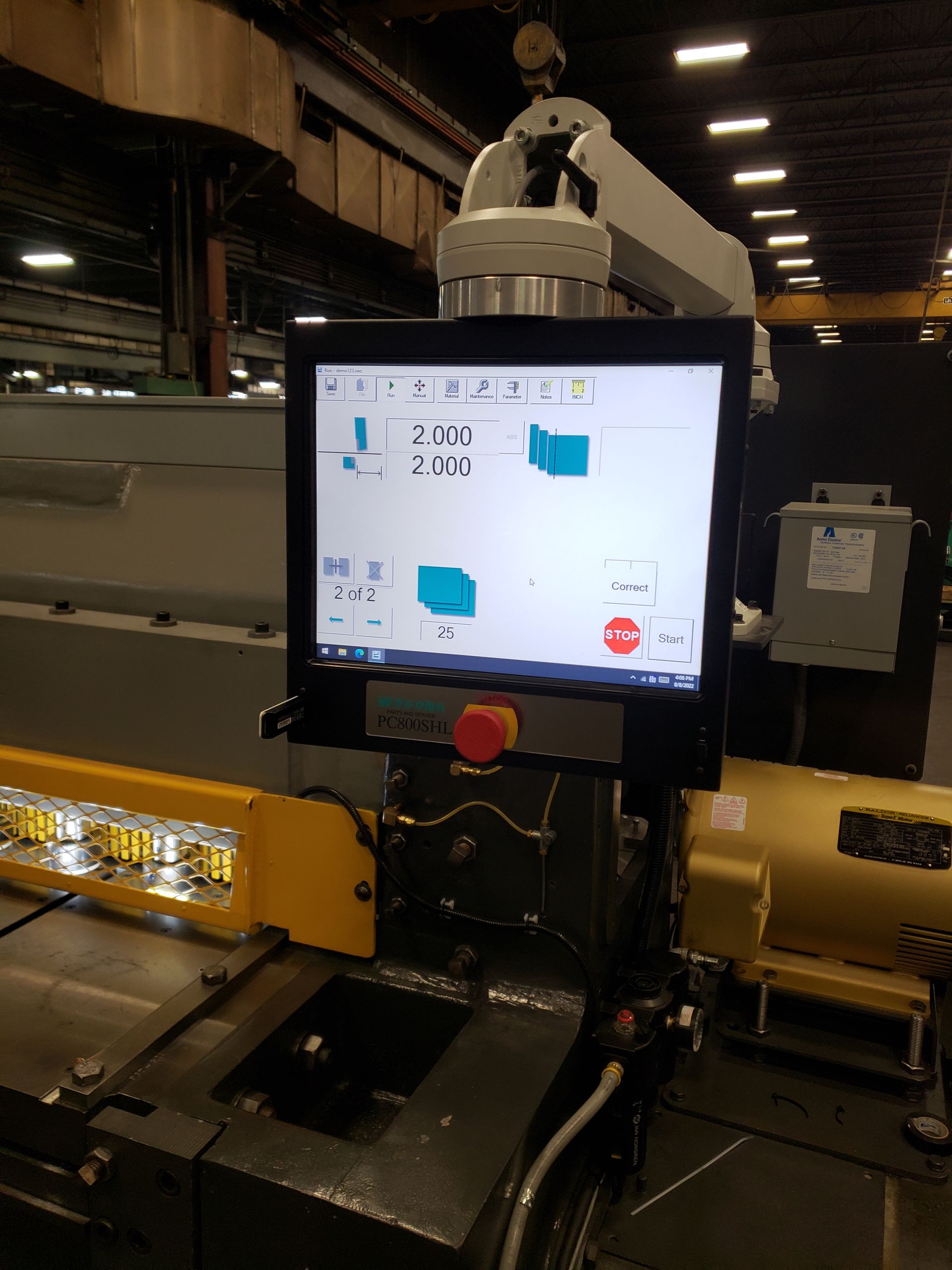
A CNC shear control upgrade modernizes the machine’s control technology rather than automatically replacing the entire cutting system. PC Controls’ shear solution combines a PC-based controller, a touchscreen interface, and software developed for shear programming and operation.

The exact scope deserves careful attention. Before approving a project, ask the supplier to explain which existing components will remain and which require replacement. Request confirmation of the functions included in the finished system, rather than assuming that every adjustment will become automatic.

For example, discuss whether the project concerns the controller alone or also requires work on the gauging system, electrical components, or other equipment. A clearly defined scope makes it easier to compare proposals and understand what the investment will accomplish.

Which Metal Shears Can Be Retrofitted?

PC Controls lists CNC shear control retrofits for equipment from Cincinnati, Amada, Wysong, AllSteel, Piranha, Pacific, LVD, and Fischer. Its published applications include both mechanical and hydraulic Cincinnati shears, along with specific Amada models.

Cincinnati Shear Retrofits

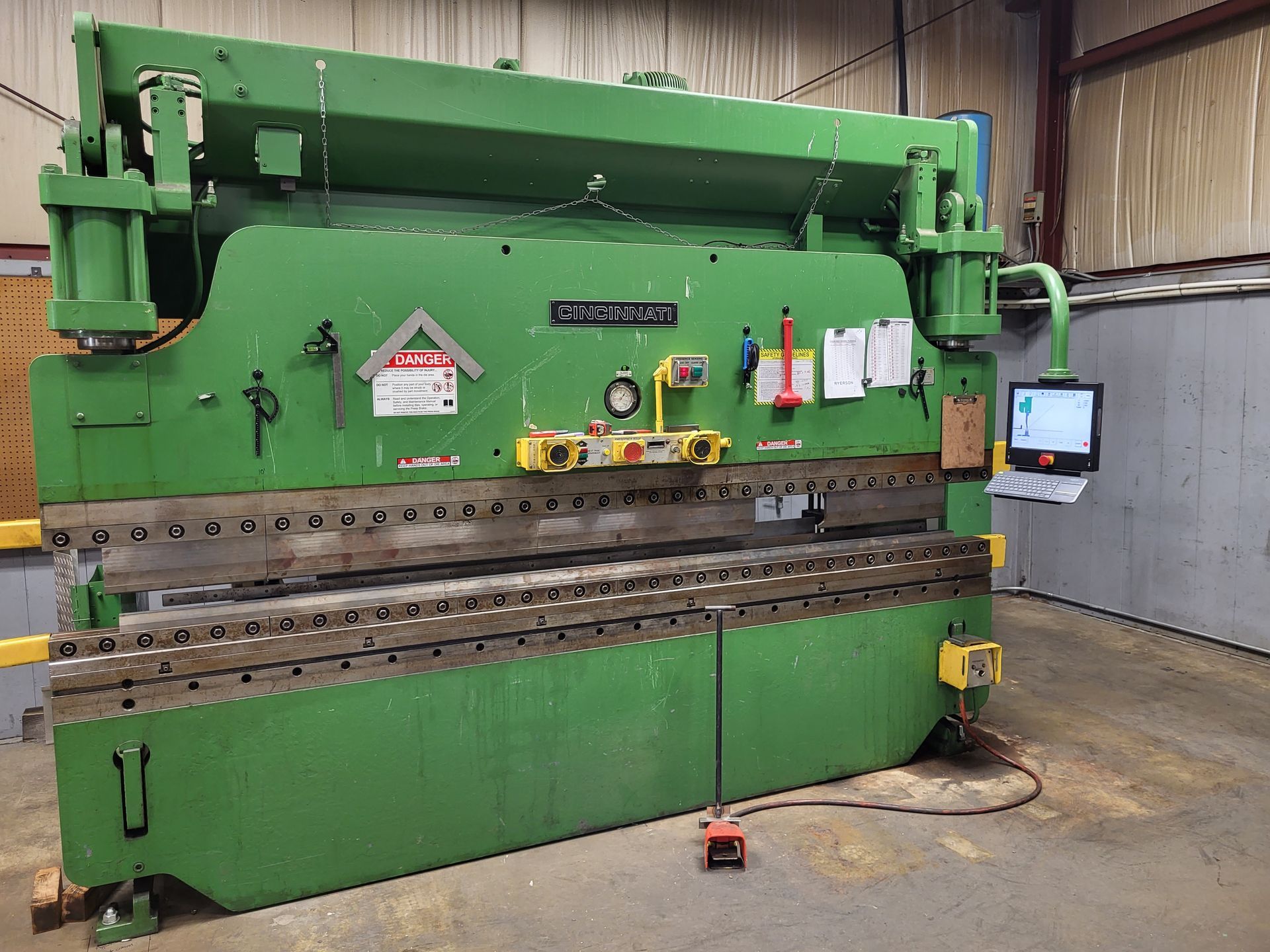
The company’s supported-equipment list includes Cincinnati mechanical and hydraulic shears with FSU and FSU III controls. When discussing a Cincinnati shear retrofit, identify both the machine and its existing control so the proposed upgrade can be evaluated against the actual configuration.

Amada and Wysong Shear Retrofits

PC Controls also lists Amada M3060 and M4060 shears, as well as Wysong applications using PC100 controls. These are useful starting points for a compatibility discussion, not a reason to assume that every machine bearing the same brand requires an identical retrofit.

Provide the model information and explain any previous modifications. Ask the retrofit team to confirm the recommended solution for your machine before selecting equipment.

What Can Updated Shear Controls Offer?

PC Controls describes Shear Wizard as providing an intuitive interface, programming tools, and plain-English diagnostics. These features are intended to support machine setup, operation, and troubleshooting.

Consider those capabilities in terms of the work your operators perform. Ask how they would enter a typical job, change a dimension, and identify a control message. Compare the proposed workflow with the steps your team follows today.

PC Controls provides Shear Wizard demonstrations for Cincinnati, Amada, Wysong, and Piranha machines, and offers interactive online demonstrations. Reviewing the appropriate version is a practical way to move beyond a feature list and examine how the software would be used.

Bring representative jobs to that discussion. A demonstration is more useful when it addresses your usual materials, dimensions, and production changes rather than an unfamiliar sample task.

Evaluate the Machine, Not Just the Controller

PC Controls identifies otherwise sound machinery with unreliable, difficult-to-support controls as a strong retrofit candidate. That makes the condition of the existing equipment an important part of the decision.

Ask for an assessment that separates control problems from mechanical or electrical faults. PC Controls’ support guidance notes that positioning problems can involve mechanical binding, wiring, motors, or drives. Replacing the controller should not be treated as a substitute for identifying those causes.

Also review whether the shear’s capabilities match your production requirements. Shear specifications include limits such as material capacity and maximum cutting length, while appropriate cutting settings depend on the material and thickness being processed. Do not assume that installing a new controller changes those physical limits.

The objective should be a complete, usable system. Ask which repairs are necessary, which components are suitable to retain, and whether any production requirement remains outside the machine’s capabilities.

Plan the Installation Around Production

A CNC retrofit should be evaluated as an installation and training project, not simply a controller purchase.

PC Controls describes a process that begins with machine details and photographs, followed by an evaluation and quotation. Its installation process includes operator and maintenance training, electrical and operational documentation, and a parts run-off using the customer’s tooling and materials.

Before scheduling the work, agree on which jobs will be used to demonstrate the upgraded shear. Choose examples that reflect everyday production and any specific requirements discussed during the quotation.

Make time for the people who will operate and maintain the equipment to participate. Ask who will receive the documentation, who will manage support requests, and how the team will confirm that the agreed functions are working before returning the shear to regular production.

What Should You Include in a Shear Retrofit Quote Request?

PC Controls’ retrofit inquiry form asks for the machine type, manufacturer, model, control type, and whether the machine is currently running. It also asks customers to describe the main issues and the improvements they expect from the retrofit.

Use that opportunity to be specific. Instead of writing “the machine needs updating,” explain what is prompting the project. Describe the interruptions, operating difficulties, or support concerns you want addressed.

Include recent photographs and available machine documentation. Identify any functions that must remain available after the upgrade, along with the jobs you expect the machine to handle.

When reviewing the proposal, compare the complete scope rather than the controller price alone. Ask whether the quotation includes integration, required component replacements, installation, testing, training, and documentation. Use your own maintenance and production records when evaluating the potential value of the project.

Explore CNC Shear Retrofit Options With PC Controls

An effective retrofit starts with a clear objective: preserve equipment that remains useful while addressing the control technology that needs improvement.

Review the available software, confirm the machine’s condition, and define what successful operation will look like after installation. Those steps create a stronger basis for choosing between a control upgrade, a more extensive retrofit, or replacement equipment.

Contact PC Controls to discuss your CNC shear retrofit. Share your machine model, existing control, and production requirements to request an evaluation of the available upgrade options.

By Matthew Amo • October 30, 2026
An outdated backgauge control does not automatically mean your press brake needs an entirely new positioning system. A press brake backgauge retrofit can replace aging control technology while retaining mechanical equipment that still works well. For compatible machines, this creates an opportunity to modernize the controls without discarding a usable backgauge. The important question is what your equipment actually needs. Is the existing control becoming difficult to support? Does the backgauge require mechanical repairs? Or has your production work outgrown the current system? Understanding those differences helps you plan a CNC retrofit around the right investment, rather than replacing too much or upgrading too little. What Does a Press Brake Backgauge Retrofit Include? A programmed backgauge system combines a controller with a motorized positioning mechanism. The operator enters dimensions, and the gauge moves through the programmed positions needed for the job. The controller and the mechanical backgauge work together, but they are not the same component. A backgauge retrofit may therefore involve upgrading the control while keeping the existing mechanism, or replacing more of the system when its condition requires it. That distinction matters when requesting quotes. “New backgauge controls” and “a complete replacement backgauge” describe different scopes of work. Before choosing equipment, ask the retrofit provider to identify what will remain, what will be replaced, and which functions the completed system will provide. When Does a Backgauge Control Upgrade Make Sense? A control-focused upgrade is worth evaluating when the backgauge remains serviceable and meets your fabrication needs. PC Controls advises that a backgauge in good condition, or one that can be repaired economically, does not necessarily need replacement. Compatible, reliable servo motors and amplifiers may also remain in use after evaluation. When the electronics become the limiting factor Control support can become a concern even while the mechanical equipment remains useful. For example, Automec identifies its CNC 99, CNC 1000, CNC 2000, and G24 controls as obsolete and no longer serviceable by the manufacturer. It also describes upgrade options for systems whose mechanical structures remain in good condition. That makes the distinction between control replacement and backgauge replacement especially important. Before approving another repair, ask whether it addresses the immediate fault only or provides a supportable path for continued operation. When programming needs have changed A control upgrade can also be considered for its programming capabilities. PC Controls’ PC800 press brake control includes Bend Wizard software with graphical programming and part-simulation features. These offer a different operating experience from controls without those capabilities. Evaluate those features against your actual work. Ask to see how an operator would program a representative part, make a correction, and return to that job later. When Is Backgauge Replacement the Better Choice? A new controller should not be treated as a substitute for repairing a faulty mechanical system. When the backgauge itself is no longer working properly, the scope may need to include mechanical repairs or replacement rather than an electronics-only upgrade. The practical question is whether the existing backgauge can meet your requirements after reasonable repairs. Ask for an assessment that distinguishes control faults from mechanical problems before deciding which components to retain. Replacement may also be worth discussing when the existing gauge no longer suits the work you need to produce. PC Controls offers Automec replacement backgauges with options for X-axis movement, which moves the gauge in and out, and R-axis movement, which adjusts its height. The appropriate configuration depends on the application. Bring examples of the parts that challenge your current setup. That gives the retrofit team a clearer objective than simply asking for “more capabilities.” Can Hurco and Automec Backgauges Be Retrofitted? PC Controls documents control upgrades for press brakes equipped with both Hurco and Automec systems. Its Hurco retrofit examples include a Pacific K Series press brake with an Autobend 5 control and a Cincinnati CB press brake with an Autobend IV control. These illustrate an important detail: the press brake manufacturer and the backgauge control manufacturer may be different. The company’s Automec examples include a Wysong MTH press brake with a CNC 99 control and a Pacific J Series press brake with a CNC 1000 control, both upgraded using PC800 controls. When requesting a Hurco backgauge retrofit or an Automec control upgrade, provide identification for both the press brake and the existing control. Ask the supplier to confirm compatibility with your specific configuration rather than relying on the brand name alone. What Can a PC800 Control Upgrade Add? PC Controls’ PC800 press brake system uses Bend Wizard programming software. Its documented features include automatic program creation, two-dimensional part simulation, DXF importing for tooling and part profiles, and the ability to attach photographs to part files as tooling-orientation references. For a shop evaluating a press brake control upgrade, those features provide specific capabilities to investigate. Consider whether operators would benefit from seeing the forming sequence, referencing setup photographs, or preparing programs away from the machine. Automec’s PC800 documentation also describes saving jobs for later recall and programming either at the press brake or offline. These capabilities are relevant to shops that regularly return to previously produced parts. Rather than judging a control by its screen alone, compare the complete workflow. How will your team create a program, select tooling, document the setup, and retrieve the job when the next order arrives? How Should You Compare Retrofit Quotes? Compare the scope of work before comparing the bottom-line price. Ask each provider to specify whether the proposal includes only the controller or also motors, drives, wiring, mechanical repairs, installation, and training. Request a clear explanation of any components that will remain dependent on older replacement parts. Include your own operating costs in the decision. Review recent repair expenses, control-related production interruptions, and the time operators spend preparing repeat jobs. Use your shop’s records rather than assuming that another facility’s savings will apply to yours. The most useful proposal is one that connects the recommended equipment to your machine’s condition and your production requirements. Preparing for a Press Brake Backgauge Retrofit Before requesting a quote, gather the press brake’s make and model, the control identification, and the backgauge’s model or serial number where available. Prepare recent photographs and a description of the problems you want the retrofit to solve. Also identify the functions you need to preserve. Explain which jobs run well today, which setups create difficulty, and what you expect from the upgraded system. PC Controls begins its evaluation with machine details and photographs. Its documented installation process includes operator and maintenance training, electrical and operational documentation, and a parts run-off using the customer’s tooling and materials. Ask how that run-off will demonstrate the functions and results agreed upon for your project. Discuss Your Retrofit Options With PC Controls The starting point is not “replace everything” or “keep everything.” It is a clear understanding of what your press brake needs to continue serving your operation. PC Controls provides CNC control retrofit solutions for metal fabrication equipment, including press brakes equipped with Hurco and Automec backgauge systems. Its documented installations provide a starting point for discussing your own machine. Contact PC Controls to discuss your press brake backgauge retrofit. Share your machine details and production goals to explore whether a control upgrade, backgauge replacement, or a combination of both is appropriate for your equipment.
By Matthew Amo • October 9, 2026
Retrofitting CNC Machines | PC Controls
By Matthew Amo • June 30, 2025
Modern manufacturing demands precision, speed, and uptime—but aging press brakes often struggle to keep pace. A Press Break retrofit swaps out obsolete control electronics for a PC-based system, transforming your existing brake into a high-performance asset. Instead of investing in a brand-new machine, a retrofit leverages your current hydraulics and frame, delivering faster setups, tighter tolerances, and years of additional service life.  What Is a Press Break Retrofit? A Press Break retrofit involves removing the original control panel, CPUs, and I/O modules from your press brake and installing a standardized PC800 control enclosure. This turnkey upgrade seamlessly integrates with your back-gauge, crowning system, safety interlocks, and foot pedal, while layering in modern software features—like graphical programming, automated bend sequences, and real-time diagnostics. Core Elements of a Press Break Retrofit When you choose a press break retrofit from PC Controls, you gain: PC800 Touchscreen Interface A rugged 19" industrial display running intuitive software, replacing dozens of archaic buttons and switches. Graphical Bend Wizard Software Automatically generates bend sequences from imported CAD or DXF files, letting operators preview each step and adjust on-screen before touching the brake. Advanced Safety Integration Electronic light-curtain and gate monitoring tie directly into the control’s I/O modules, ensuring full compliance with current OSHA and CE standards. Back-Gauge & Crowning Interface Multi-axis positioning delivers programmable crowning, taper compensation, and programmable offsets for complex bending operations. Remote Diagnostics & Support Built-in VPN and remote-access tools enable PC Controls engineers to troubleshoot faults, deploy updates, and optimize parameters without an on-site visit. Hydraulic Leveling Valve Upgrade Peak productivity demands consistent ram parallelism across the bed. As part of a press break retrofit, an electronic hydraulic leveling valve replaces your manual or analog system: Dual Linear Scale Feedback measures ram alignment in real time. Electronic Valve Control adjusts crown settings automatically, ensuring uniform bending pressure across long parts. Programmable Crown Profiles let you switch between tapers, radii, or multi-step bends at the touch of a button—no manual shim changes required. The result is first-pass accuracy on every job, even when switching between thin sheets and heavy plate. Productivity & Accuracy Gains Shops that invest in a press break retrofit typically see immediate improvements: 30–40% Faster Setups by loading CAD profiles directly into Bend Wizard, eliminating manual calculation and trial bends. 20–25% Scrap Reduction thanks to on-screen simulation and automated crowning—first-part success becomes the norm. Minimized Downtime as solid-state drives, modern processors, and standardized I/O modules replace flaky legacy electronics. Beyond speed and quality, the modern control platform generates maintenance logs, alarm histories, and usage analytics—helping you plan preventive service rather than react to failures. When to Schedule Your Retrofit To maximize ROI and minimize disruption, plan your press break retrofit: During Planned Maintenance Windows : Coordinate with annual shutdowns or slow seasons. Before Major Production Runs : Ensure peak reliability when tackling high-volume orders. When OEM Support Ends : Retrofits safeguard against obsolete control boards that are no longer stocked. To Meet New Safety Standards : Leverage modern control interlocks and monitoring to comply with updated regulations. Early planning prevents the unplanned downtime that can cripple delivery schedules and customer confidence. Case Study: Boosting Throughput at a Regional Fab Shop A Midwestern sheet-metal shop retrofitted their 100-ton press brake with PC800 controls, Bend Wizard, and an electronic leveling valve. In six months they reported: 35% Reduction in Setup Time – standard jobs went from 25 minutes to under 16 minutes. 18% Less Scrap – perfect first-part accuracy on complex angles. Zero Control-Related Failures – legacy board failures dropped to zero after retrofit. The total retrofit paid for itself in just five months through labor savings and reduced material waste. Ready to Unlock Peak Productivity? Don’t let outdated controls slow your shop down. Contact PC Controls today for a customized Press Break retrofit proposal and transform your existing brake into a modern, high-efficiency powerhouse.
By Matthew Amo • June 30, 2025
Upgrading your press brake doesn’t always mean buying new equipment. A Cincinnati retrofit replaces aging control hardware on legacy press brakes—like the Autoshape or CB series—with PC Controls’ modern PC800 control platform and Bend Wizard software. This turnkey solution revitalizes your machine’s accuracy, reduces downtime, and delivers a rapid return on investment at a fraction of the cost of an OEM replacement.  What Is a Cincinnati Retrofit? A Cincinnati retrofit involves stripping out obsolete Cincinnati control electronics—legacy CPUs, custom panels, and unsupported I/O boards—and installing a standardized, PC-based control enclosure. The retrofit harnesses your existing hydraulic system and back-gauge mechanics, layering on intuitive graphical programming, real-time diagnostics, and remote support capabilities. Key Components of the PC800 Cincinnati Retrofit Kit 19″ Touchscreen Control Panel : A rugged, industrial-grade display runs PC800 software, providing drag-and-drop part setup. Bend Wizard Software : Automatically generates bend sequences from imported DXF or CAD profiles, eliminating manual calculation errors. Back-Gauge Interface Module : Plugs into your existing stepper or servo motors, enabling multi-axis positioning and programmable crowning. Foot Pedal & Safety Integration : Retains your shop’s footswitch and light-curtain safety circuits, with electronic interlocks managed by the PC800 I/O modules. Remote Diagnostics & Updates : Built-in VPN and TeamViewer support let PC Controls engineers troubleshoot issues and install firmware updates without an on-site visit. Cincinnati Retrofit vs. OEM Replacement Cost Efficiency : A Cincinnati retrofit typically runs 30–40% of the price of a comparable new machine, preserving your capital budget. Lead Time : Retrofit projects can be completed in days rather than the months often required for a new press brake delivery. Customization : Unlike off-the-shelf machines, each retrofit is tailored to your workflow—whether you need custom gauge lengths, specialized crowning, or unique safety features. Sustainability : Retrofitting reduces waste by extending the useful life of your existing equipment, aligning with green manufacturing goals. Case Study: Modernizing a Cincinnati Autoshape A Midwest fabrication shop retrofitted their 150-ton Cincinnati Autoshape press brake with PC800 controls and Bend Wizard. Within three months they reported: 25% Faster Setup Times : Graphical programming cut setup from 30 minutes to 22 minutes on average. 20% Scrap Reduction : First-pass success increased as Bend Wizard guided operators through each bend sequence. Zero Control-Related Downtime : The shop eliminated failures caused by discontinued Cincinnati CPU boards. The total retrofit paid for itself in under five months through labor savings and reduced material waste. When to Schedule Your Cincinnati Retrofit During Planned Maintenance : Coordinate the retrofit with annual shutdowns to avoid unplanned production losses. Before Large Runs : Ensure your press brake is fully reliable ahead of high-volume or high-precision orders. When Legacy Support Ends : OEM control support for many Cincinnati series ceased years ago—proactively retrofit before parts become unobtainable. To Improve Safety : Upgraded controls support modern light-curtains and electronic guard monitoring to meet current regulations. Ready to Upgrade? Don’t let obsolete controls limit your shop’s potential. Contact PC Controls today for a custom Cincinnati retrofit quote and transform your press brake into a modern, high-performance workhorse.
By Matthew Amo • June 30, 2025
Older Hurco press brakes and brake presses equipped with Autobend controls were once the gold standard for precision metal forming. Yet as those legacy electronics age, shops face rising downtime, scarce replacement parts, and limited software capabilities. A Hurco retrofit from PC Controls swaps out outdated Autobend boards for our modern PC800 control platform—delivering graphical programming, real-time diagnostics, and years of additional service life without the expense of a new machine.  What Is a Hurco Retrofit? A Hurco retrofit involves replacing a Hurco machine’s aging control electronics—typically Autobend processors and proprietary panels—with a standardized, PC-based control enclosure. Rather than sourcing obsolete circuit boards or rebuilding legacy hardware, the retrofit installs PC800 controls, integrates your existing hydraulics and back-gauge system, and layers in intuitive software tools like Bend Wizard to streamline programming. Why Invest in a Hurco Retrofit? Obsolete Electronics Hurco discontinued support for many Autobend components over a decade ago. When a circuit board fails, replacement parts can take weeks—or simply aren’t available. Rising Downtime Costs Legacy controls lack modern fault-diagnostic features. A simple sensor error can require hours of troubleshooting. Limited Programming Flexibility Older Hurco software doesn’t support DXF import, graphical part simulation, or auto-program generation—features that new hires expect and that boost productivity. By contrast, a Hurco retrofit addresses all three pain points at once, with predictable lead times and a fixed project cost. PC Controls’ Hurco Retrofit Solution Our retrofit kit is built around the PC800 control platform, designed specifically for press brakes and brake presses: Graphical User Interface : 19″ touch-screen panel with drag-and-drop part setup. Bend Wizard Software : Automatic bend sequence generation from imported CAD profiles. Real-Time Diagnostics : Live status logs, alarm history, and sensor monitoring keep you ahead of maintenance issues. Modular Design : Standard I/O modules plug directly into existing back-gauge motors, crowning cylinders, and safety interlocks. Remote Support : Built-in VPN and TeamViewer allow offline shops to receive instant software updates and troubleshooting from PC Controls engineers. The Hurco Retrofit Process Site Survey & Assessment Technicians evaluate your Hurco model (e.g., Autobend 545, 365, or 874 series) to confirm electrical and mechanical compatibility. Custom Control Design We configure the PC800 enclosure and I/O modules to match your machine’s exact back-gauge axes, crowning valves, and safety circuits. On-Site Installation In one focused outage, our team removes legacy electronics, mounts the PC800 control panel, and connects all field wiring. We calibrate linear scales, crowning functions, and verify safety interlocks. Operator Training & Handover After commissioning, we provide hands-on training for your operators: part programming, recipe storage, diagnostic routines, and routine software updates. Ongoing Support Quarterly firmware releases and 24/7 email support ensure your retrofitted Hurco maintains peak performance year after year. Key Benefits of a Hurco Retrofit Extended Equipment Life : Gain 10–15 years of additional service without buying new machinery. Reduced Downtime : Modern solid-state drives and processors dramatically cut mean-time-to-repair. Enhanced Productivity : Automated bend sequencing and CAD import shrink setup times by up to 40%. Improved Part Accuracy : Graphical simulation and interactive back-gauge adjustments ensure first-pass success. Fast ROI : Many shops recoup retrofit costs in under six months through labor savings and reduced scrap. When to Schedule Your Hurco Retrofit During Planned Maintenance Windows : Coordinate with annual shutdowns to minimize production impact. Before Major Production Runs : Ensure reliability when tackling high-volume or high-precision orders. Ahead of Software End-of-Life : Retire unsupported Autobend firmware before it causes unexpected stoppages. When Training New Operators : Modern controls are easier to learn, reducing onboarding time. Case Study: Modernizing a 60-Ton Hurco Brake Press A mid-sized fabrication shop in Ohio retrofitted their 60-ton Hurco brake press with PC800 controls and Bend Wizard. After the retrofit: Setup Time dropped by 35% Scrap Rates decreased by 20% Emergency Repairs went from 4 per year to zero The retrofit paid for itself in under four months—and the shop has since scheduled two more Hurco retrofits based on that success. Ready to Bring Your Hurco Machine into the 21st Century? Don’t let obsolete controls limit your shop’s potential. Contact PC Controls today for a tailored Hurco retrofit quote and experience modern control performance on your legacy equipment.
By Jonathan Fitzgerald • June 30, 2025
Upgrading your CNC control system doesn’t always mean investing in a brand-new machine. A CNC control retrofit replaces aging, unsupported electronics with a modern, PC-based control platform—extending equipment life, boosting productivity, and delivering a rapid return on investment. What Is a CNC Control Retrofit? A CNC control retrofit involves removing obsolete control hardware—keyboards, joysticks, legacy processors—and installing a PC-based control system like the PC800. This turnkey upgrade provides graphical programming interfaces (Bend Wizard, Shear Wizard, Punch Wizard), real-time diagnostics, and seamless integration with existing hydraulics and back-gauges. Signs Your Machine Needs a Retrofit Consider a retrofit when you encounter any of the following: Frequent Downtime: Old electronics fail more often, interrupting production. Obsolete Parts: Legacy control boards are no longer supported or stocked. Limited Programmability: You can’t run advanced software features—DXF import, 2D/3D part simulation, or auto-program creation. These pain points often surface in shops running 15–20-year-old CNC systems—prime candidates for a cost-effective retrofit. The Retrofit Process Consultation & Assessment Our team evaluates your machine model (press brake, shear, punch) and determines compatibility with the PC800 control. Custom Control Design We tailor the PC800 control panel to your workflow, integrating Bend Wizard for press brakes, Shear Wizard for shears, or Punch Wizard for single punches. On-Site Installation & Commissioning Certified technicians remove old electronics, mount the PC800 enclosure, connect linear scales, back-gauges, and safety interlocks, then calibrate the system. Installation by experts ensures minimal downtime. Operator Training & Support We provide hands-on training so your team masters the new graphical UI and maintenance tools. Post-retrofit support includes remote diagnostics and comprehensive product literature. Key Benefits of a CNC Control Retrofit Extended Machine Lifespan: Upgrade controls for a fraction of the cost of a new machine—gain another 10+ years of service. Improved Uptime & Reliability: PC-based hardware with solid-state drives and modern processors reduces failures and simplifies troubleshooting. Intuitive Graphical Interface: Visual part simulation and DXF import speed programming and lower the learning curve for new operators. Real-Time Monitoring & Diagnostics: Built-in alarms, status logs, and maintenance prompts let you fix issues before they halt production. Rapid ROI: Many fabricators recoup retrofit costs in under six months through reduced maintenance and faster setups. When to Schedule Your Retrofit Before Major Production Runs: Avoid unplanned downtime by retrofitting during planned maintenance windows. When Legacy Support Ends: Control manufacturers often discontinue support after 10–15 years—plan ahead to prevent disruptions. Prior to Process Expansion: New product lines requiring tighter tolerances or complex geometries demand modern control features. To Improve Safety & Compliance: Modern controls support safety interlocks, light-curtains, and guard monitoring—critical for meeting updated regulations.  Case Study: Fast Payback in a Mid-Size Shop A regional fab shop retrofitted two 200-ton press brakes with PC800 controls and Bend Wizard software. Within three months, they: Reduced setup time by 25% Cut scrap rates by 15% Eliminated obsolete control-board failures The total retrofit investment was recouped in under four months—transforming aging equipment into reliable, high-precision workhorses. Ready to Modernize? Don’t let outdated CNC controls hold your shop back. Contact PC Controls today for a custom CNC control retrofit quote and breathe new life into your metal-forming equipment.
By Matthew Amo • March 3, 2025
In today’s fast-paced metal fabrication industry, staying competitive means modernizing equipment without incurring the steep costs of full machine replacements. CNC Retrofits are emerging as a cost-effective solution to revitalize aging machinery while ensuring that production remains efficient, precise, and adaptable to modern requirements. Understanding CNC Retrofits CNC retrofits involve upgrading older machines with PC-based control systems that provide state-of-the-art interfaces and real-time monitoring capabilities. This process allows fabricators to: Integrate Modern Software: Replace outdated control panels with intuitive software solutions like Bend Wizard, Shear Wizard, and Punch Wizard. Improve Operational Precision: Benefit from enhanced control features that improve accuracy in metal fabrication processes. Extend Machine Lifespan: Maximize the value of existing machinery by updating only the control system rather than purchasing entirely new equipment. Why Upgrading Matters Many metal fabricators face challenges with obsolete CNC systems, including limited functionality and increased downtime. Modernizing these systems offers several benefits: Enhanced Production Efficiency: New control systems streamline processes and reduce cycle times. Reduced Maintenance Costs: Modern interfaces simplify troubleshooting and repair, helping to lower long-term maintenance expenses. Competitive Advantage: Upgraded machines are better equipped to handle the precision and complexity demanded by modern fabrication techniques. Product Spotlight: Press Kit and Punch Kit At PC Controls, the focus is on providing tailored retrofit solutions: Press Kit: Designed specifically for press brakes and related machinery, the Press Kit integrates modern PC-based controls with existing hardware. This upgrade enhances the machine’s performance, ensuring smoother operation and improved precision. Punch Kit: Ideal for retrofitting single punches and other forming equipment, the Punch Kit offers robust control solutions that bring advanced diagnostics and real-time feedback to traditional machinery. These products are part of a broader suite of offerings that not only improve machine functionality but also extend the life of the equipment, ensuring that fabricators can continue to produce high-quality work without interruption. Real-World Applications Many companies are turning to CNC retrofits as a way to solve common industry challenges: Reducing Downtime: Upgraded controls allow for faster diagnostics and quicker repairs, minimizing production interruptions. Improving Product Quality: Enhanced precision means fewer errors and less material waste, resulting in better end products. Cost Savings: By updating only the control systems, companies avoid the significant capital expense associated with purchasing brand-new machinery. Tips for a Successful Retrofit Implementing a CNC retrofit project requires careful planning: Evaluate Your Needs: Consider which parts of your machine require the most attention. Focus on areas that directly impact productivity and quality. Plan for Integration: Ensure that new controls can be seamlessly integrated with your existing equipment. This might involve minor modifications or additional support services. Train Your Team: Modern systems come with advanced features. Investing in proper training will maximize the benefits of the retrofit and ensure your staff can leverage all available functionalities. Embracing CNC Retrofits is a strategic move that can significantly boost operational efficiency, reduce downtime, and enhance product quality—all without the need for a complete machine overhaul. With innovative solutions like the Press Kit and Punch Kit, metal fabricators have the tools to transform aging equipment into modern, reliable production workhorses. By choosing a retrofit approach, businesses can secure a competitive edge while safeguarding their investment in legacy machinery.
By Matthew Amo • March 3, 2025
The metal fabrication industry has long relied on CNC machines for precision and reliability. However, many of these machines come equipped with outdated controls that struggle to meet modern production demands. CNC Control Retrofits offer a revolutionary solution—upgrading existing systems to harness the latest technology, improve performance, and reduce operational costs. The Evolution of CNC Controls CNC control systems have evolved dramatically over the years. Earlier models were built on legacy technology that is now obsolete, lacking the intuitive interfaces and robust features of modern systems. Upgrading to CNC control retrofits means: Integrating PC-Based Technology: This enables more dynamic interfaces and real-time monitoring. Accessing Advanced Software: Tools like Bend Wizard, Shear Wizard, and Punch Wizard help operators manage complex operations with ease. Boosting Machine Intelligence: Newer control systems can process data faster, allowing for smarter and more efficient production cycles. Addressing Industry Challenges Fabricators frequently encounter issues with outdated controls: Inconsistent Performance: Older systems can lead to variability in production, affecting both quality and output. High Maintenance Needs: Aging electronics often require more frequent repairs, driving up maintenance costs. Limited Upgradability: Legacy systems can make it difficult to implement new features or integrate with modern software platforms. CNC control retrofits directly address these challenges by replacing outdated components with modern, reliable technology that is designed to evolve with industry advancements. Spotlight on Retrofit Solutions PC Controls offers a range of products that serve as perfect examples of CNC control retrofits in action: Press Kit: Specifically engineered for press brakes, this retrofit solution transforms legacy systems by integrating advanced control mechanisms. This results in improved operational stability and enhanced precision. Punch Kit: Tailored for single punches and similar equipment, the Punch Kit brings real-time monitoring and sophisticated diagnostics to older machines. This upgrade minimizes errors and ensures consistent performance. Benefits for Metal Fabrication Businesses Implementing CNC control retrofits can lead to significant improvements across various aspects of metal fabrication: Enhanced Precision and Accuracy: Modern controls enable finer adjustments, reducing material waste and improving overall quality. Operational Flexibility: Upgraded systems offer customizable settings and greater adaptability to different production requirements. Streamlined Workflow: Faster processing speeds and intuitive interfaces contribute to smoother, more efficient production cycles. Cost Efficiency: By avoiding the need for entirely new machines, businesses can realize substantial cost savings while still achieving high-tech performance. How to Choose the Right Retrofit Solution For companies considering a retrofit, several factors should be taken into account: Assess Current Machinery: Identify which machines would benefit the most from a control upgrade. Determine Production Goals: Understand what improvements are needed, whether it’s increased precision, reduced downtime, or enhanced monitoring capabilities. Consult with Experts: Engaging with a company like PC Controls can provide insights into the best retrofit solutions, tailored to your specific machinery and production needs. Future-Proofing Your Operations One of the most compelling reasons to invest in CNC control retrofits is the opportunity to future-proof your operations. As technology continues to advance, modern retrofit solutions offer: Scalability: Easily upgrade and expand your systems as new features become available. Sustained Performance: Maintain high levels of productivity and quality over time without the need for frequent, costly overhauls. Enhanced Support: Access ongoing technical support and software updates that keep your machinery operating at its best. CNC Control Retrofits are not just an upgrade—they’re a revolution in how metal fabrication businesses approach modernization. By investing in solutions like the Press Kit and Punch Kit, companies can seamlessly transform outdated equipment into efficient, modern production tools. These retrofits offer a clear path to enhanced precision, improved workflow, and significant cost savings, ensuring that your business stays at the forefront of the industry. Embracing these upgrades today means preparing your operations for the technological challenges of tomorrow.